
VCOrganizer Pro
It syncs with Outlook client using USB, WiFi, Bluetooth or syncs over the internet in real-time..
If you have problem to purchase VCO from Android Market, please contact [email protected].
You can also purchase VCOrganizer Pro+/Ent+ from our website directly http://www.vecal.biz
*** To avoid any unhappy experiences, before purchasing, please try the free App VCOrganizer Lite from Market, with 14 days free trial.
***
For more, please visit http://www.vecal.biz/vcorganizer-pro.htmlhttp://vcorganizer.blogspot.comhttp://facebook.com/VCOrganizer
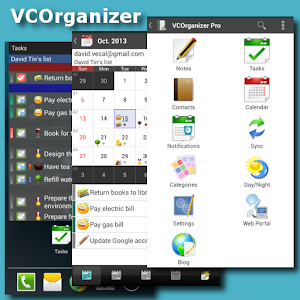
Features---------- Sync Outlook Tasks, Notes, Contacts, Events, Categories to your Android devices- Sync Android with Outlook using USB*,WiFi, Bluetooth**- Remote or Real-time sync Android with Outlook over internet.- Built-in Chat app, which allows user to share items to multiple devices or friends.- Support Attachments for Notes, Tasks, Contacts and Events.- Password and Pattern lock- AES Encryption- Backup/Restore from SD card- Web Portal for accessing VCO contents on your phone from the browser on your PC.- SmartLinks which links contacts, notes, tasks, events together- Universal search- Advanced reminder features such as Auto Snooze, Custom Voice reminder ..etc.- Share Notes, Tasks, Contacts and Events to other apps.- Notes/Tasks/Events/Contacts Widgets- Notes/Tasks/Calendar/Contacts Shortcuts- Build-in Notes, Tasks, Calendar and Contacts App, it also sync with Android Contacts and Android Calendar on your device.- AutoSync and AutoBackup ***- Advanced Filter (e.g: Contacts in Category A or B, and with keywords in notes "XYZ")- Create/edit recurring event (Daily/Weekly/Monthly/Yearly, no end date, end by occurrences, and end by date) .
The recurring pattern can be synced back to Outlook.
e.g: Occurs every 2 day(s) effective 27 Dec 2011 until 27 Dec 2012 from 10:00am to 11:00am Occurs every Tuesday,Friday effective 27 Dec 2011 until 27 Dec 2012 from 10:00am to 11:00am Occurs day 27 of every 2 month(s) effective 27 Dec 2011 until 27 Dec 2012 from 10:00am for 2 days Occurs the third Tueday of every 3 month(s) effective 27 Dec 2011 until 27 Dec 2012 from 10:00am to 11:00am Occurs every 2year(s) on January 17 effective 27 Dec 2011 until 27 Dec 2012 from 10:00am to 11:00 Occurs the second Tuesday of January effective 27 Dec 2011 from 10:00am for 2 hours
- Support MS Outlook Client 2003, 2007, 2010 & 2013, 2016 (32bit, 64bit)
This app supports all the languages, and with the following user interfaces:English, French, German, Spanish, Italian, Chinese (Traditional / Simplified)
* This is optional and you can purchase USB Extension module from Market.** This is optional and you can purchase Bluetooth extension module please search VCO-BluetoothExt from Market*** This is optional and you can purchase the AutoSync Extension, pls search VCOrganizer AutoSync from the market
*********************************************** Note: *******************************************1) If you are using Android Tablet(3.0+), please purchase VCOrganizer Tab.2) If you have any problem, please visit our forum or send email to support at [email protected] or visit our forum http://www.vecal.biz/forum.htm3) Products comparison table: http://www.vecal.biz/product_comp.htm4) Support: [email protected]
About VCOrganizer Pro
- Package name (App ID)
- com.vecal.vcorganizer
- Available on
- Google Play
- Price
- Free
- Version
- v9.1.1.422
- Developer
- MobiSystems
Looking for the VCOrganizer Pro APK?
The safest way to get VCOrganizer Pro (com.vecal.vcorganizer) on your Android device is to install it directly from Google Play — you'll always get the latest official version, automatic updates, and no risk of modified or infected APK files from third-party sites.
Social Features
Connect and share with friends and the community.
Productivity Tools
Boost your productivity with powerful tools and features.
Food & Dining
Discover recipes and order food from your favorite restaurants.
See VCOrganizer Pro in Action


Frequently Asked Questions
Is VCOrganizer Pro free?
Yes, VCOrganizer Pro is free to download and install on Android through Google Play.
How do I install VCOrganizer Pro on Android?
Open Google Play on your Android phone or tablet, search for VCOrganizer Pro by MobiSystems or tap the Google Play button on this page, then tap Install. The app downloads and installs automatically.
What is com.vecal.vcorganizer?
com.vecal.vcorganizer is the App ID (package name) of VCOrganizer Pro on Google Play. Every Android app has a unique package name, and it is the safest way to verify you are installing the official app.
Is VCOrganizer Pro safe to download?
Installing VCOrganizer Pro from Google Play is the safest option: you get the official version published by MobiSystems, verified by Google Play Protect, with automatic updates. Avoid APK files from unofficial third-party sites.
Get VCOrganizer Pro Today
VCOrganizer Pro for Android — free download on Google Play.
Compatible with Android phones and tablets — available on Google Play.
Ask AI about this app
Get instant answers about features, tips and more from popular AI assistants.